Open source · Free
Claude Code Plugin for Supaflow
Create datasources, build pipelines, run syncs, manage schedules, and operate private Docker agents from chat. Let your AI agent handle the repetitive pipeline work so your team can focus on making decisions from the data instead of wrangling it.
Generic AI agents can sketch a pipeline in seconds — but sketches don't survive real sources, schema drift, or 2am incidents. This plugin puts Claude on top of the real Supaflow CLI, so the pipeline it builds is a pipeline that actually runs in production.
Choose Your Install Path
Supaflow supports two Claude surfaces. Claude Code installs the Supaflow plugin for terminal workflows. Claude Desktop connects to the host-side MCP server that ships with @getsupaflow/cli 0.5.0+. Both paths need the CLI installed, authenticated, and pointed at a workspace.
Claude Code
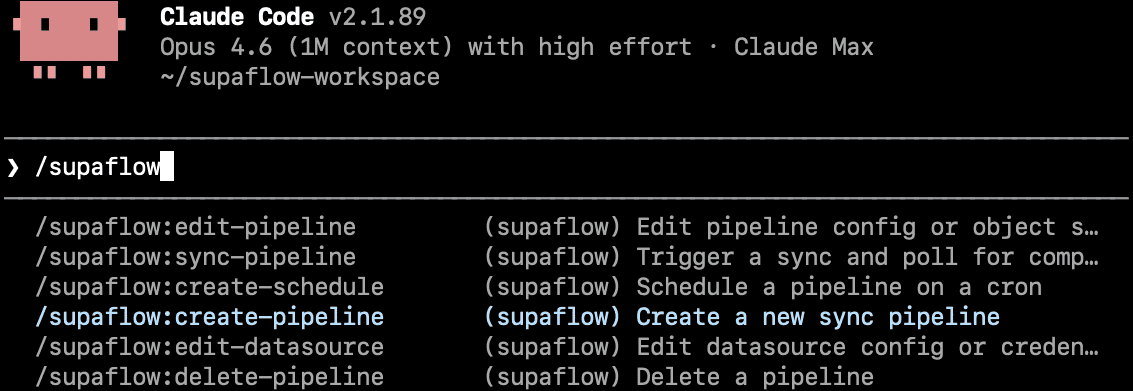
Use this when you work in the terminal and want slash-command workflows like /create-pipeline or guided private-agent operations.
npm install -g @getsupaflow/clisupaflow auth loginclaude plugin marketplace add https://github.com/supaflow-labs/supaflow-claude-plugin.gitclaude plugin install supaflowTerminal Claude Code gets the plugin commands directly. When MCP tools are available, the plugin prefers them for Supaflow operations.
Claude Desktop
Use this when you want Supaflow tools inside Desktop chat.
npm install -g @getsupaflow/clisupaflow auth login{ "mcpServers": { "supaflow": { "command": "supaflow", "args": ["mcp"] } } }Add the MCP config to claude_desktop_config.json, then fully restart Claude Desktop. If Desktop cannot find supaflow, use the absolute path from which supaflow.
Local plugin development
Use this when you are testing a checkout of the plugin repo.
git clone https://github.com/supaflow-labs/supaflow-claude-plugin.gitclaude --plugin-dir ./supaflow-claude-plugin--plugin-dir loads the plugin for that Claude session only. Run your prompt in that same session, or use the marketplace install for a persistent setup.
What You Can Do With It
The plugin is meant for practical day-to-day pipeline work. It helps Claude stay useful when you need to create, inspect, run, or schedule real Supaflow resources.
Create datasources
Connect a source or destination from Claude using the same Supaflow CLI workflow you would run manually.
Build pipelines
Ask Claude to set up a new pipeline, choose objects, and confirm the final configuration before anything is created.
Run and monitor syncs
Start a sync, check job status, and inspect failures without bouncing between docs, terminal history, and dashboards.
Schedule recurring loads
Add or update a schedule from chat once the pipeline is working and you are ready to automate it.
Run private agents
Deploy, resume, inspect, and troubleshoot a local Docker agent from Claude while its identity stays on your host. Safe upgrades require Supaflow CLI 0.5.0+.
Run known commands, not invented ones
Every Claude action routes through an approved Supaflow command. No invented flags. No guessed field names. No one-off shell scripts.
Fork the plugin
The project is open source, so you can inspect how it works or reuse the same pattern for your own CLI-based workflows.
Why this plugin exists
Generic AI agents are good at producing a plausible pipeline. They are much worse at producing one that survives real-world edge cases. This plugin stops Claude from inventing pipelines from scratch and routes it through real Supaflow workflows, so the result is faster to build and far more reliable to operate.
Supaflow handles authentication, execution, retries, and state. Claude drives; the platform operates.
What a real session looks like
Excerpts from a real Claude Code (terminal) session (March 2026) — building a Postgres to Snowflake pipeline end to end. The plugin is invoked conversationally; real commands run in the terminal; real output flows back to Claude. In Claude Desktop the same operations run through MCP tools rather than shell commands.
Create a datasource
session excerptClaude recovers from a failed connection and the plugin auto-encrypts credentials before they land on disk.
Create a pipeline
session excerptThe plugin asks before acting. Claude scopes with structured options, respects the narrower answer, and filters the config before running the create command.
Execute a pipeline
session excerptPlugin-first command syntax (pipelines sync), not shell-guess. Clean handoff into monitoring.
Check job status
session excerptClaude polls the job, narrates state transitions in plain English (queued → picked → running → completed), and confirms success with real metrics.
Typical Workflows
These are the kinds of tasks where the plugin is most useful: enough structure to be safe, but still conversational enough to move faster than typing everything by hand.
Set up a new warehouse sync
Ask Claude to connect a source and destination, build the pipeline, and walk you through the confirmation steps.
Reconnect a broken datasource
Use the plugin to inspect the existing setup, update credentials or settings, and retry without hunting through old terminal commands.
Check why a job failed
Ask Claude to check recent runs, inspect job status, and narrow down whether the issue is configuration, schema drift, or a source-side problem.
Schedule a pipeline after validation
Once the initial sync is healthy, have Claude add a recurring schedule instead of manually composing another CLI command.
Deploy, upgrade, or recover a private agent
With Supaflow CLI 0.5.0+, ask Claude to safely replace the agent image with rollback protection. Claude can also check Docker readiness, enroll or resume the agent, inspect status and logs, and guide re-enrollment only when needed.
Why It Works Better Than Free-Form AI CLI Usage
Claude helps with reasoning, Supaflow handles execution
The plugin is built for teams who want conversational help during setup and operations, but do not want the model inventing the operational layer.
Real commands are safer than generated shell snippets
Deterministic command routing, explicit confirmation gates, and setup validation reduce the common failure modes in raw AI-CLI usage: guessed flags, wrong command routing, and skipped prerequisites.
Learn Supaflow while using it
Each plugin command maps to a real Supaflow workflow. By the end of your first session you know how datasources, pipelines, syncs, schedules, and private agents actually connect — not just how to prompt Claude for them.
Get Started
Install the Supaflow CLI once, then use the plugin in Claude Code or register the MCP server in Claude Desktop. The plugin checks for CLI installation, authentication, and workspace selection automatically on first run.
1. Install and authenticate the Supaflow CLI
Both Claude Code and Claude Desktop run on the CLI. Install it globally, then log in and select a workspace.
View CLI docs to create an API key, run supaflow auth login, and select a workspace.
2. Claude Code (terminal)
Add the plugin from the marketplace, then start a session. Slash commands like /create-pipeline are available, or just ask Claude to build a pipeline.
3. Claude Desktop
Register the Supaflow MCP server in your claude_desktop_config.json, then fully restart Claude Desktop and ask Claude to build or sync a pipeline.
If Desktop can't find supaflow, use the absolute path from which supaflow as the command — Claude Desktop launches with a minimal PATH.
Frequently Asked Questions
A few practical questions that usually come up before teams start using the plugin in real workflow conversations.