Snowflake Native ETL: Why ETL Should Run Inside Snowflake

Most ETL tools move your data through a third-party cloud before loading it into Snowflake. Supaflow takes a fundamentally different approach: the pipeline engine runs inside your Snowflake account as a Snowflake Native App. Your data never leaves Snowflake.
We are now live on the Snowflake Marketplace -- install directly from Snowsight and start running pipelines in under 20 minutes.
What Does "Snowflake Native" Actually Mean?
When an ETL tool is described as a "Snowflake connector" or "Snowflake integration," it typically means the tool runs on its own infrastructure and pushes data into Snowflake over the network. The data passes through the vendor's cloud -- sometimes across regions, sometimes across continents.
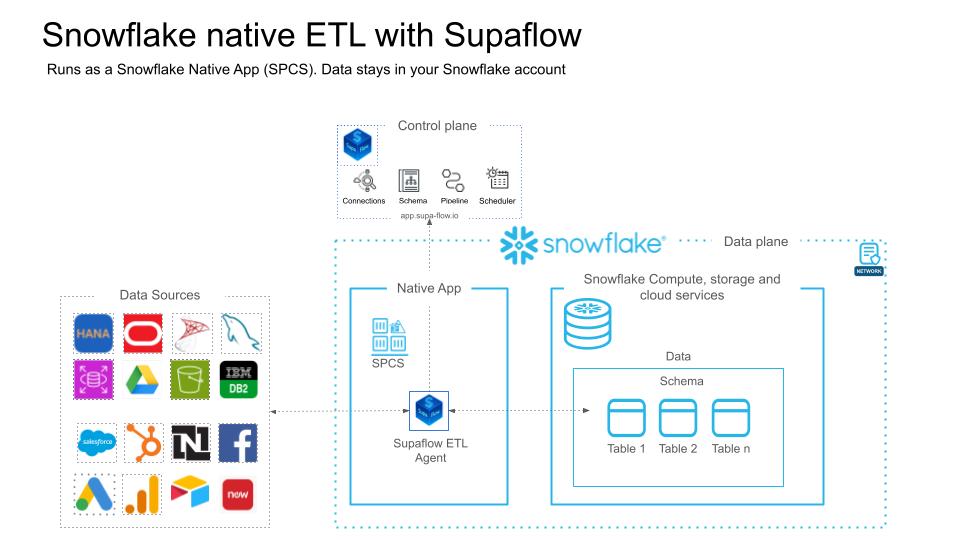
A Snowflake Native App is different. It is an application that runs directly inside your Snowflake account using Snowpark Container Services (SPCS). The compute happens on Snowflake infrastructure, within your account's security boundary. The data stays in Snowflake at every stage -- ingestion, staging, transformation, and loading.
This distinction matters for three reasons:
- Data residency: Your row-level data never traverses external networks. Staging files, intermediate tables, and final destination tables all live within your Snowflake account.
- Credential isolation: Source credentials are encrypted with customer-managed keys and stored in the Supaflow control plane. Only your account can decrypt them during pipeline execution.
- Network posture: The SPCS agent communicates outbound-only over HTTPS to the Supaflow control plane. There is no inbound network path to your Snowflake account from Supaflow's infrastructure.
How Supaflow Runs Inside Snowflake
Supaflow's architecture separates the control plane from the data plane:
- Control plane (app.supa-flow.io): Handles scheduling, monitoring, configuration, and the user interface. No customer data passes through the control plane.
- Data plane (your Snowflake account): The pipeline agent runs as an SPCS service. It connects to your data sources, extracts records, stages them, and loads them into Snowflake tables.
When a sync job runs:
- The control plane sends job instructions to the SPCS agent over HTTPS.
- The agent connects to the source system (e.g., Salesforce, HubSpot, PostgreSQL) and extracts records.
- Records are staged in Snowflake internal stages -- never written to external storage.
- The agent loads staged data into your destination tables using Snowflake's optimized bulk loading.
- Job metrics and status are reported back to the control plane.
The entire extract-load cycle happens within SPCS. The control plane never sees your data.
The Security Case for Snowflake Native ETL
Security teams evaluate data integration tools on three axes: data exposure, network surface, and credential handling. Snowflake native deployment addresses all three differently than external tools.
Data exposure: With external ETL, your production data is copied to the vendor's infrastructure during processing. Even if the vendor encrypts data at rest and in transit, the data physically exists outside your environment during the sync window. With native deployment, the data never leaves your Snowflake account. There is no copy of your data on Supaflow's servers.
Network surface: External ETL tools typically require you to allowlist the vendor's IP ranges so they can connect to your warehouse. This creates an inbound network path to your Snowflake account. The SPCS agent uses outbound-only HTTPS -- it reaches out to the Supaflow control plane, but the control plane cannot initiate connections into your Snowflake account.
Credential handling: Source system credentials (e.g., Salesforce OAuth tokens, database connection strings) are stored in the Supaflow control plane, encrypted with customer-managed keys. During pipeline execution, credentials are decrypted inside the SPCS agent -- the plaintext credential exists only in-memory within your Snowflake environment.
For teams operating under HIPAA, SOC 2 Type II, or data residency regulations, native deployment simplifies the compliance conversation. The data processing happens within your existing Snowflake security perimeter, which is already covered by your organization's security certifications. Read more about our security practices.
Native ETL vs. External ETL: What Changes?
| External ETL | Snowflake Native ETL | |
|---|---|---|
| Data path | Source -> Vendor cloud -> Snowflake | Source -> Your Snowflake account |
| Data egress | Data leaves your environment | Data stays in your environment |
| Network exposure | Vendor needs inbound access to warehouse | Outbound-only HTTPS from SPCS |
| Compliance | You depend on vendor's SOC 2, data processing agreements | Data never leaves your Snowflake security perimeter |
| Compute | Vendor-managed infrastructure | Snowflake-managed SPCS compute pool |
| Billing | Separate vendor invoice | Pay with existing Snowflake credits via Marketplace Capacity Drawdown |
| Latency | Network round-trip to vendor cloud | Co-located compute, no external network hop for loading |
When to Use Snowflake Native ETL
Native deployment is the strongest choice when:
- Regulated industries (healthcare, financial services, government): Data residency requirements prohibit sending data to third-party clouds. With Snowflake native ETL, the data never leaves your account.
- Large-scale ingestion: Eliminating the network round-trip to an external vendor reduces latency and avoids data egress costs. Loading happens directly from SPCS into Snowflake tables.
- Security-conscious teams: If your security posture requires minimizing the number of vendors with access to your data, native deployment means Supaflow's infrastructure never touches your row-level data.
- Snowflake-committed spend: If you have committed Snowflake credits, paying for ETL through Marketplace Capacity Drawdown avoids a separate procurement cycle.
When External Deployment Works Fine
Not every use case needs native deployment. Supaflow also supports VPC and cloud deployments for teams that:
- Use multiple warehouses (e.g., Snowflake + BigQuery) and need a single tool for all destinations.
- Have simpler compliance requirements where third-party data processing is acceptable.
- Prefer to manage their own compute infrastructure.
Performance Benefits of Co-Located Compute
When your ETL tool runs outside Snowflake, every record must travel over the network: extracted from the source, processed on the vendor's infrastructure, then loaded into Snowflake via the Snowflake Ingest API or COPY command. This network round-trip adds latency and becomes a bottleneck for large-volume syncs.
With Snowflake native ETL, the loading step happens locally. The SPCS agent writes staging files to Snowflake internal stages and loads them using Snowflake's optimized bulk loading path. There is no external network hop between staging and the destination table. For pipelines that move millions of rows per sync, this can significantly reduce end-to-end sync time.
The SPCS compute pool scales with your Snowflake account. You control the compute pool size, and Snowflake manages the underlying infrastructure. There is no separate capacity planning for the ETL layer.
Pay with Your Existing Snowflake Credits
Because Supaflow is a Snowflake Marketplace listing, you can pay for it using Snowflake's Marketplace Capacity Drawdown program. Instead of a separate vendor contract and procurement cycle, the cost draws directly from your existing Snowflake committed capacity. One invoice, one vendor relationship, no new budget approvals.
This is particularly valuable for enterprise teams where adding a new vendor requires security review, legal approval, and budget allocation. With Marketplace Capacity Drawdown, Supaflow is covered under your existing Snowflake agreement.
What You Get
The Supaflow Native App includes the full pipeline engine -- the same one that powers our VPC and cloud deployments. Once installed, you can:
- Ingest from any supported source -- Salesforce, HubSpot, PostgreSQL, Airtable, Google Drive, SQL Server, Oracle Transportation Management, Salesforce Marketing Cloud, and more -- directly into Snowflake tables.
- Run incremental syncs with automatic schema detection, cursor tracking, and schema evolution handling.
- Manage everything from the Supaflow UI at app.supa-flow.io -- no Snowflake SQL required for day-to-day operations.
- Monitor pipeline health with detailed job metrics, error reporting, and alerting.
- Build custom connectors using the Connector SDK -- your custom connectors run inside SPCS too.
The agent handles compute, staging, and loading inside SPCS. The Supaflow control plane coordinates scheduling and monitoring over an outbound-only HTTPS connection.
Getting Started
Installation takes about 15-20 minutes. You will need a paid Snowflake account with ACCOUNTADMIN access (trial accounts do not support External Access Integrations).
Step 1: Sign up for Supaflow (free 31-day trial, no credit card required).
Step 2: Run the Snowflake setup script to create a dedicated role, service user, warehouse, and database. The script is provided in the deployment guide.
Step 3: Install the Supaflow Native App from the Snowflake Marketplace listing in Snowsight.
Step 4: Connect the Native App to your Supaflow account and grant the required privileges.
Step 5: Create your first pipeline -- select a source, pick your objects, and start syncing.
The full walkthrough with screenshots and SQL scripts is in the Snowflake Native App Deployment Guide.
Frequently Asked Questions
Does my data leave Snowflake?
No. The pipeline agent runs inside your Snowflake account using Snowpark Container Services. Source data is extracted by the agent, staged in Snowflake internal stages, and loaded into Snowflake tables. Row-level data never passes through Supaflow's cloud infrastructure.
What Snowflake edition do I need?
Any paid Snowflake edition that supports Snowpark Container Services and External Access Integrations. Trial accounts are not supported. Enterprise and Business Critical editions are fully supported.
How is this billed?
You can pay through Snowflake's Marketplace Capacity Drawdown program using your existing Snowflake committed credits. Alternatively, you can pay Supaflow directly. SPCS compute costs are billed by Snowflake as part of your normal Snowflake usage.
Can I use all the same connectors?
Yes. The Native App runs the same pipeline engine as our cloud and VPC deployments. All connectors are available, including custom connectors built with the Connector SDK.
How does this compare to Fivetran or other ETL tools?
Most ETL tools -- including Fivetran, Airbyte, and Hevo -- run on their own infrastructure and push data into Snowflake over the network. Supaflow's native deployment runs the pipeline engine inside your Snowflake account. This eliminates data egress, reduces network exposure, and lets you pay with Snowflake credits. See how Supaflow compares to Fivetran directly, or browse the broader roundup of Fivetran alternatives if you're still shortlisting.
Can I switch between native and cloud deployment?
Yes. The same Supaflow account supports both deployment models. You can run some pipelines natively in Snowflake and others through the cloud or VPC deployment.
Try It Out
View Supaflow on the Snowflake Marketplace
If you already have a Supaflow account, install the Native App directly from the listing above. If you are new to Supaflow, sign up for a free trial and follow the deployment guide to get running.
New to Supaflow? Read Introducing Supaflow to learn how we unify ingestion, transformation, and activation in one platform. Or explore our connectors to see what data sources we support.
Questions? Reach out at support@supa-flow.io.
 Ask Claude